Description
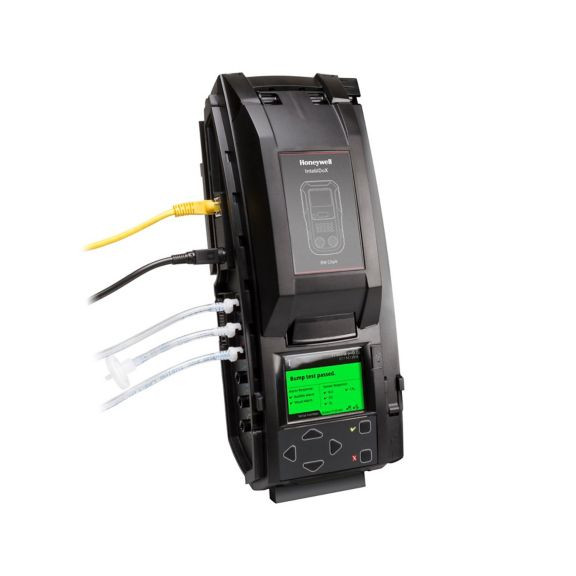
The IntelliDoX Docking Station (Model: DX-MCLP) is a smart, automated management system for GasAlert?MicroClip XL / X3 multi?gas detectors. It combines intelligent docking modules with Fleet Manager II software to streamline bump tests, calibration, configuration, and data logging — improving productivity, reliability, and compliance.
When a detector is placed into the dock, the IntelliDoX module automatically runs tests (like bump tests), configures settings, and records results. It reduces manual effort, speeds up testing, and helps maintain compliance by tracking instrument usage and test history.
Key features:
-
FastBump test: very quick bump test cycles to reduce downtime.
-
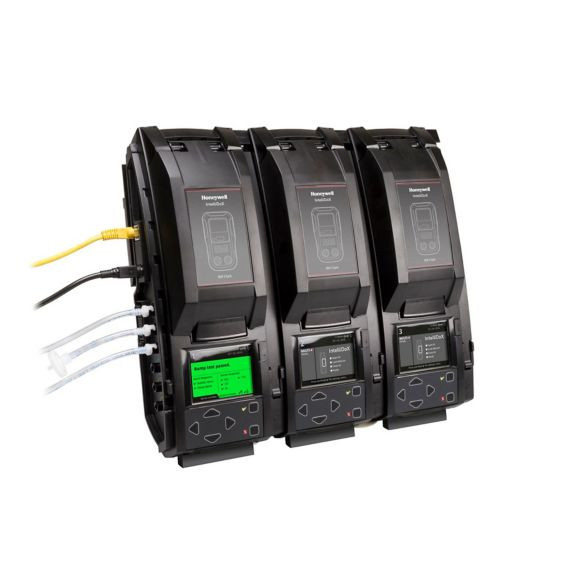
Gangable: Up to 5 modules can be chained together. Each module has its own LCD screen and keypad, so they can operate independently.
-
Connectivity: You can connect via Ethernet or use the USB port to transfer data (bump tests, exposure logs) easily.
-
Automatic bump test & span calibration: Supports both kinds of testing without manual intervention.
-
Device configuration: Through the dock, you can change alarm set points, set non?compliance reminders (when a bump test is due), update firmware, set hibernation, and more.
-
User interface: LCD display with color indicators — e.g., yellow for “TEST”, green for “PASS” and red for “FAIL.”
-
Pump: Each module has its own internal pump (flow rate ~?350 ml/min).
-
Automatic tests timings:
-
FastBump: ~10 seconds
-
Standard bump: ~40 seconds
-
-
Data storage: 2?GB internal memory in each docking module.
-
Power: Uses 12?V, 8.33?A ITE power supply.
-
Certifications: Complies with CSA / UL 61010-1; also meets EMC and low?voltage directives.
-
Warranty: 2 years.
Physical Details
-
Dimensions (one module): ~?5.4 in (width) × 14.2 in (height) × 4.3 in (depth) ≈ 13.8 × 36.2 × 10.9 cm.
-
Weight: ~ 4.2 lb / 1.91 kg.
-
Mounting: It has a retractable stand / wall-mount built in.
Supported Detectors / Compatibility
-
Compatible with:
-
GasAlertMicroClip XL
-
GasAlertMicroClip X3
-
-
Uses a factory-installed nest for these detectors in the docking module.
-
Requires Fleet Manager II software for managing data and setting configurations.
-
You also need an Enabler Kit for standalone modules.
Functionality & Benefits
-
Automated Bump Testing: Greatly reduces the time and effort for compliance testing.
-
Data Management: With Ethernet / USB connectivity, data (like bump test history and peak exposures) can be downloaded easily for reporting.
-
Scalable Setup: Since you can chain up to 5 modules, it's scalable for large fleets of detectors.
-
Flexible Configuration: You can reconfigure alarm setpoints, schedule reminders, and change other detector parameters, right through the dock.
-
Efficiency: The FastBump test helps save calibration gas, reduces wait times, and increases throughput.
-
Reliability & Compliance: Helps enforce regular testing and keeps reliable logs, reducing risk of non-compliance.
Use Cases
-
Industrial Safety Programs: In plants or sites where many MicroClip detectors are used, the IntelliDoX system can manage regular bump testing automatically.
-
Maintenance / Safety Departments: Helps safety teams maintain a fleet of detectors easily with minimal manual work.
-
Regulated Environments: Useful in industries where audit trails of gas detector testing (bump tests, calibration) are required.
-
Remote or Networked Sites: Can be connected over Ethernet to central servers for data integration, or use USB for offline data transfer.
Limitations / Points to Consider
-
You need a separate Enabler Kit for each standalone module (if not chaining).
-
Requires calibration gas and associated tubing / regulators to perform span calibration.
-
Initial setup requires configuration (alarm set-points, schedule, etc.) via software.
-
Power requirement: need to ensure reliable 12?V / 8.33?A supply.
More Info
Gas Detector Docking Station for Routine Fleet Testing
The BW IntelliDoX Docking Station is a gas detector docking station designed for routine bump test and calibration workflows for safety teams managing GasAlertMicroClip XL and GasAlertMicroClip X3 units. Safety coordinators, maintenance technicians, and site supervisors typically use this dock to streamline test history, data logging, and compliance tracking. This CSA/UL 61010-1 certified equipment features automated management through Fleet Manager II software.
Industry Applications and Professional Use
Oil & Gas Work Environments
Safety teams in oil & gas facilities typically use the IntelliDoX docking module when crews rely on frequent gas detector checks before entering process areas. The dock supports bump test and span calibration routines that help reduce manual handling during busy shift changes. It also supports compliance tracking for sites that need clear test history records.
Manufacturing Work Environments
Maintenance technicians and equipment managers commonly use this gas detector dock in plants where detectors move between production lines, confined spaces, and maintenance bays. The LCD screen and keypad on each module support direct status checks at the point of use. FastBump testing can help keep detector fleets moving through daily workflows.
Utilities Work Environments
Utility crews often need a reliable calibration workflow for detectors used around energized infrastructure, treatment sites, and service corridors. IntelliDoX supports Ethernet and USB connectivity for reporting and exposure logs. That makes it practical for centralized safety programs.
Mining Work Environments
In mining operations, industrial hygienists and safety coordinators use docked testing systems to manage detector readiness across remote crews. The internal pump and automated tests support repeatable procedures in demanding environments. Gangable modules also help larger fleets stay organized.
Transportation Work Environments
Transportation maintenance shops often need quick turnaround for detector inspection and data transfer. This dock works well for recurring fleet management tasks where test history and alarm set points matter. It supports efficient documentation for busy service schedules.
Emergency Services Work Environments
Service technicians and emergency response programs commonly use this system when multiple detectors require regular bump tests and configuration updates. The standalone module design and retractable stand or wall-mount setup support flexible station layouts. All Safety customers often choose this format for organized testing stations.
Technical Specifications and Product Features
Understanding Product Standards
Technical features matter because they shape speed, reliability, and recordkeeping in detector maintenance workflows. The IntelliDoX system combines automated testing, 2 GB internal memory per module, and simple data transfer options to support fleet management. It also uses a 12 V, 8.33 A ITE power supply for stable operation.
| Specification | What It Means | Practical Benefit |
|---|---|---|
| CSA/UL 61010-1 | Safety and electrical compliance certification | Supports use in regulated equipment programs |
| FastBump: 10 seconds | Rapid bump test cycle | Helps reduce downtime during routine checks |
| Up to 5 gangable modules | Multiple docks can connect together | Scales testing for larger detector fleets |
| Ethernet and USB connectivity | Data transfer options for reporting | Supports centralized logging and offline transfer |
Use Case Scenarios and Applications
Daily Fleet Management
Sites use this dock when GasAlertMicroClip XL or GasAlertMicroClip X3 detectors need regular bump testing before shifts. The automated workflow reduces manual steps and supports repeatable compliance routines. Workers can review PASS, TEST, and FAIL indicators quickly at the module.
Calibration and Configuration Workflows
Maintenance teams typically use the docking station when they need span calibration, alarm set points, firmware update tasks, or reminder settings. Fleet Manager II software helps organize those settings across a detector program. That structure supports consistent calibration workflow control.
Regulated Audit Preparation
Safety coordinators often use the system when they need test history and exposure logs for audits. The dock records results automatically and stores data in module memory. That makes documentation easier to retrieve for reporting.
Networked or Offline Data Transfer
Teams generally use Ethernet for connected reporting or USB for offline transfer at remote facilities. This setup helps keep detector records moving between the field and the office. It also supports large-scale safety programs with mixed site access.
Ideal Applications and Work Environments
Where This Docking Station Fits Best
- Industrial plants: Automates bump test and calibration routines for detector fleets that move through maintenance and operations teams.
- Maintenance departments: Organizes test history, data logging, and firmware update tasks in one station.
- Regulated work sites: Supports audit trails and recurring compliance tracking for detector programs.
- Networked safety programs: Uses Ethernet or USB accessories for centralized reporting and exposure logs.
Professional Applications
Workers Who Rely on This Equipment
- Safety coordinators: They manage detector readiness, compliance tracking, and testing schedules.
- Maintenance technicians: They run bump tests, calibration, and configuration tasks.
- Industrial hygienists: They review exposure logs and detector usage records.
- Equipment managers: They oversee fleet organization and module assignment.
- Site supervisors: They monitor routine detector checks across active work areas.
- Service technicians: They support setup, software use, and dock operation per manufacturer instructions.
Complete Safety Equipment Solutions
Complementary Safety Gear
The IntelliDoX docking station works alongside other equipment for a more complete gas detection program. Routine testing, recordkeeping, and detector setup work best when teams manage the full workflow instead of relying on a single device. That approach helps create a coordinated safety system.
Recommended Equipment Combinations
- Daily detector program: IntelliDoX Docking Station + gas detector + calibration gas kit + USB data accessories
- Central reporting setup: IntelliDoX Docking Station + gas detector + Ethernet network accessories
- Large fleet workflow: IntelliDoX Docking Station + gas detector + calibration gas kit
Selection Guide and Product Suitability
When to Choose This Product
Choose this dock when your team manages recurring bump tests for GasAlertMicroClip XL or GasAlertMicroClip X3 units. It also fits well when you need test history, alarm set points, and data logging in one workflow. Large fleets benefit from the gangable module design and independent LCD screens.
Key Evaluation Factors
- Detector compatibility with GasAlertMicroClip XL and GasAlertMicroClip X3 units
- Software access through Fleet Manager II software
- Data transfer needs through Ethernet or USB
- Capacity requirements for standalone modules or chained stations
Limitations and Alternative Considerations
This product is not suitable for detector models outside the listed compatibility range. Teams that need a broader multi-brand platform may want to evaluate another gas detector management system. It also depends on calibration gas, setup software, and proper power supply planning. Available from All Safety with standard, expedited, or overnight shipping to suit project timelines.
Daily Use and Maintenance
Workplace Integration
Use the dock when detectors need routine bump testing, calibration, or configuration at the shop or field service desk. Operators generally place the detector into the module and follow the LCD prompts per manufacturer instructions. Facilities commonly position the station near maintenance areas or safety offices for easy access.
Care and Replacement Guidelines
Inspect the dock, LCD indicators, connections, and pump function regularly per manufacturer guidelines. Clean external surfaces and contacts as recommended, and store the unit in a dry, protected location when not in service. Replace the module or service it if memory functions, docking performance, or power delivery show issues.